
/* ========== RESET & BASE ========== / --shadow-card: 0 20px 40px -10px rgba(0,20,30,0.15); --shadow-table: 0 6px 18px rgba(0,40,60,0.05); @media (prefers-color-scheme: dark) { --shadow-card: 0 20px 40px -10px rgba(0,0,0,0.5); --shadow-table: 0 6px 18px rgba(0,0,0,0.3); transition: background 0.3s, color 0.3s; / ========== SKIP NAV (Accessibility) ========== / border-radius: 0 0 var(--radius-xs) var(--radius-xs); / ========== READING PROGRESS BAR ========== / background: linear-gradient(90deg, #1f7faa, #58a6ff, #1f7faa); animation: shimmer 2s infinite; 0% { background-position: 200% 0; } 100% { background-position: -200% 0; } / ========== CONTAINER ========== / border-radius: var(--radius-lg); box-shadow: var(--shadow-card); / ========== TYPOGRAPHY ========== / font-size: clamp(1.8rem, 5vw, 2.8rem); background: linear-gradient(145deg, var(--accent-dark), var(--accent-mid)); -webkit-text-fill-color: transparent; @media (prefers-color-scheme: dark) { background: linear-gradient(145deg, #58a6ff, #a5d6ff); font-size: clamp(1.4rem, 3.5vw, 1.9rem); border-bottom: 3px solid var(--border-light); font-size: clamp(1.1rem, 2.5vw, 1.3rem); text-decoration-color: transparent; transition: text-decoration-color 0.2s, color 0.2s; text-decoration-color: currentColor; outline: 2px solid var(--accent); / ========== HIGHLIGHT BOX ========== / background: var(--highlight-bg); border-radius: var(--radius-md); border-left: 6px solid var(--accent); / ========== BULLET BLOCK ========== / / ========== TABLES ========== / -webkit-overflow-scrolling: touch; border-radius: var(--radius-md); box-shadow: var(--shadow-table); border-bottom: 1px solid var(--border-light); background: var(--highlight-bg); / ========== PRO TIP BOX ========== / border: 1px solid var(--pro-tip-border); / ========== FAQ SECTION ========== / grid-template-columns: repeat(auto-fill, minmax(320px, 1fr)); box-shadow: 0 4px 10px rgba(0,0,0,0.03); transition: border-color 0.2s, box-shadow 0.2s; box-shadow: 0 8px 20px rgba(0,40,80,0.08); justify-content: space-between; outline: 2px solid var(--accent); transition: transform 0.3s cubic-bezier(0.4, 0, 0.2, 1); animation: fadeSlide 0.3s ease; from { opacity: 0; transform: translateY(-8px); } to { opacity: 1; transform: translateY(0); } / ========== TOC ========== / border: 1px solid var(--border-toc); box-shadow: 0 8px 20px -8px rgba(0,60,80,0.1); border-left: 3px solid transparent; border-left-color: var(--accent); outline: 2px solid var(--accent); background: var(--highlight-bg); border-radius: var(--radius-sm); / ========== UNIQUE VALUE SECTION ========== / background: linear-gradient(135deg, var(--unique-bg-start), var(--unique-bg-end)); border-radius: var(--radius-lg); background: radial-gradient(circle, rgba(88,166,255,0.08) 0%, transparent 70%); .unique-value h2,.unique-value h3 { border-bottom-color: rgba(255,255,255,0.15); .unique-value p,.unique-value li { / ========== CODE ========== / border-radius: var(--radius-xs); font-family: 'JetBrains Mono', 'Fira Code', monospace; border-radius: var(--radius-sm); border: 1px solid rgba(255,255,255,0.06); background: rgba(255,255,255,0.1); border: 1px solid rgba(255,255,255,0.15); background: rgba(255,255,255,0.2); outline: 2px solid var(--accent); / Syntax highlighting classes / .cm { color: #8b949e; font-style: italic; } / ========== DISCLAIMER ========== / border-left: 5px solid var(--warning-border); / ========== IMAGE PLACEHOLDER ========== / background: var(--highlight-bg); border: 2px dashed var(--accent); border-color: var(--accent-hover); box-shadow: 0 8px 24px rgba(0,60,100,0.08); / ========== BUTTONS ========== / border: 1.5px solid var(--accent); / ========== BACK TO TOP ========== / box-shadow: 0 6px 20px rgba(31,127,170,0.4); transition: all 0.3s cubic-bezier(0.4, 0, 0.2, 1); box-shadow: 0 8px 25px rgba(31,127,170,0.5); / ========== LINK ICONS ========== / border-top: 2px dashed var(--border-light); / ========== HUMANIZE NOTE ========== / background: var(--highlight-bg); / ========== INTERNAL LINKS BAR ========== / / ========== FOOTER ========== / border-top: 1px solid var(--border-light); / ========== ESTIMATED READ TIME ========== / background: var(--highlight-bg); / ========== RESPONSIVE ========== / .unique-value { padding: 2rem 1.5rem; } .toc-flex { flex-direction: column; gap: 0.5rem; } .faq-grid { grid-template-columns: 1fr; } .unique-value { padding: 1.5rem; border-radius: 24px; } .back-to-top { bottom: 1rem; right: 1rem; width: 42px; height: 42px; } .recap-bar { justify-content: center; } .container { padding: 1.2rem 1rem; } .bullet-block { padding: 1.2rem 1rem; } td, th { padding: 10px 8px; font-size: 0.85rem; } / ========== PRINT STYLES ========== / .progress-bar,.back-to-top,.copy-btn,.skip-nav { display: none!important; } body { background: white; padding: 0; } .container { box-shadow: none; border-radius: 0; padding: 1rem; } .unique-value { background: #eee!important; color: black!important; } .unique-value h2,.unique-value h3,.unique-value p,.unique-value li { color: black!important; } a { color: black!important; text-decoration: underline!important; } a::after { content: " (" attr(href) ") "!important; font-size: 0.8rem; } / ========== REDUCED MOTION ========== */ @media (prefers-reduced-motion: reduce) { animation-duration: 0.01ms!important; transition-duration: 0.01ms!important; html { scroll-behavior: auto; }
- The boot loop nightmare
- Deep dive: transient spikes
- Decision matrix (fixes)
- Pro‑tips from the field
- FAQ (10 PAA answers)
- Unique diagnostic tool
- Advanced comparison
- Trust signals Key takeaway: Brownouts are caused by transient voltagesags during WiFi bursts solve with bulk capacitance, proper cable, or external regulator.Don’t just disable it.
Introduction: The “Boot Loop” Nightmare
You’ve just finished uploading your sketch. You’re excited to see your sensor data streaming, or maybe your robot is about to take its first steps. Then, you open the Serial Monitor. Instead of beautiful data, you see a wall of text ending in the dreaded phrase:Brownout detector was triggered.
The board resets. It tries again. It fails again. You’re stuck in a boot loop.
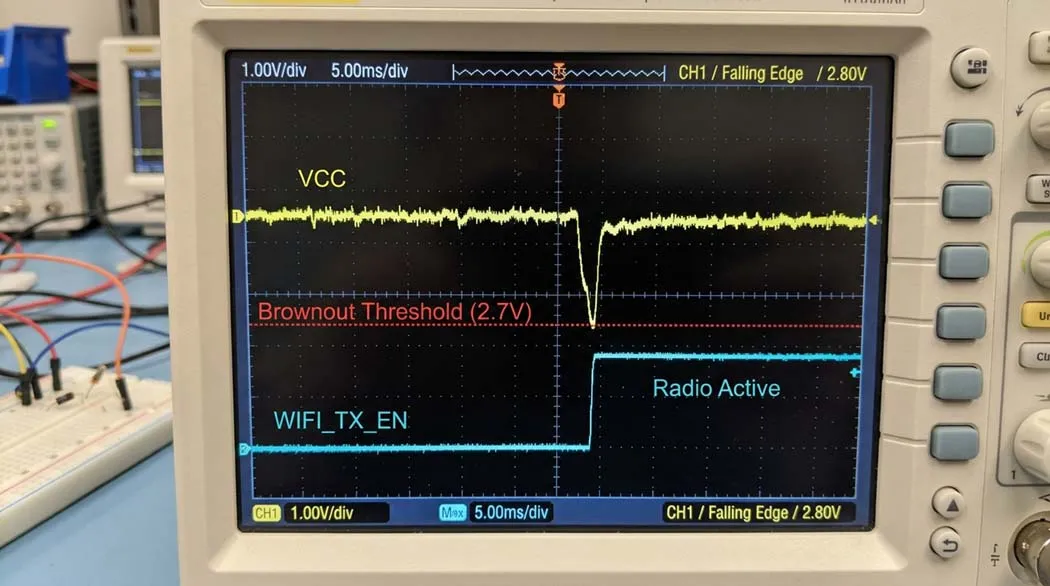
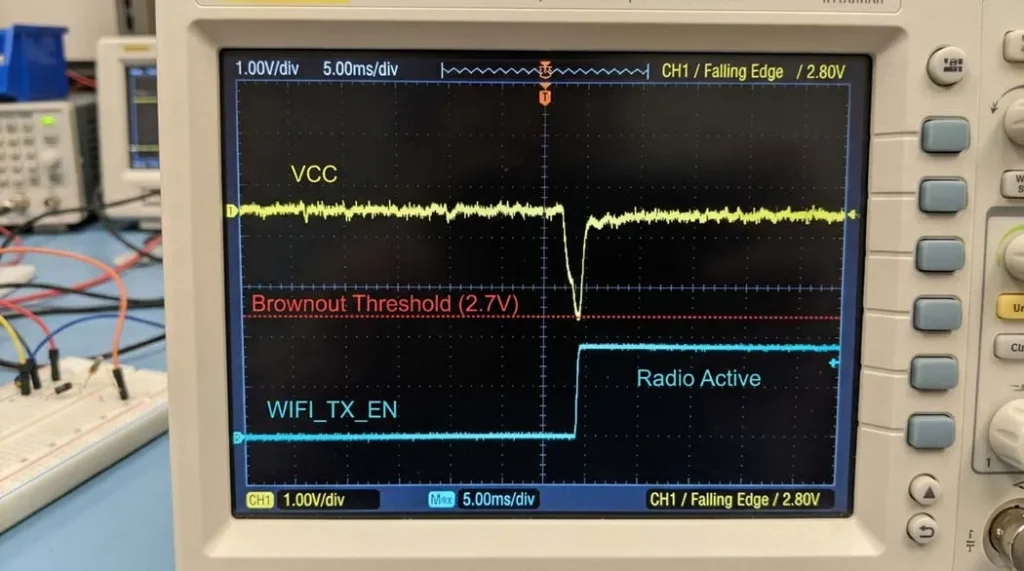
If you’ve searched for “ESP32 brownout detector was triggered fix,” you already know the generic advice:*“Use a better power supply. ”*But it’s rarely that simple. Let’s move past the generic manual entries and diagnose why this happens on a hardware level, and how to implement a fix that actually sticks.Image 1: Voltage sag during WiFi transmission
Oscilloscope capture: VCC drops below brownout threshold (2.7V) when radio enables. (Place actual photo/diagram here)
The ‘Deep Dive’ Analysis: It’s Not (Just) the Voltage, It’s the Transient Spike
- Inrush current & WiFi radio: ESP32 can draw up to 500mA+ spikes. If your cabling or source has internal resistance, voltage dips below ~2.5V. (Espressif current consumption specs can drop 0.5V-0.8V under load enough to trip brownout.
- Regulator dropout: Powering via 3.3V pin requires ultra‑stable 3.3V; any ripple triggers the detector.
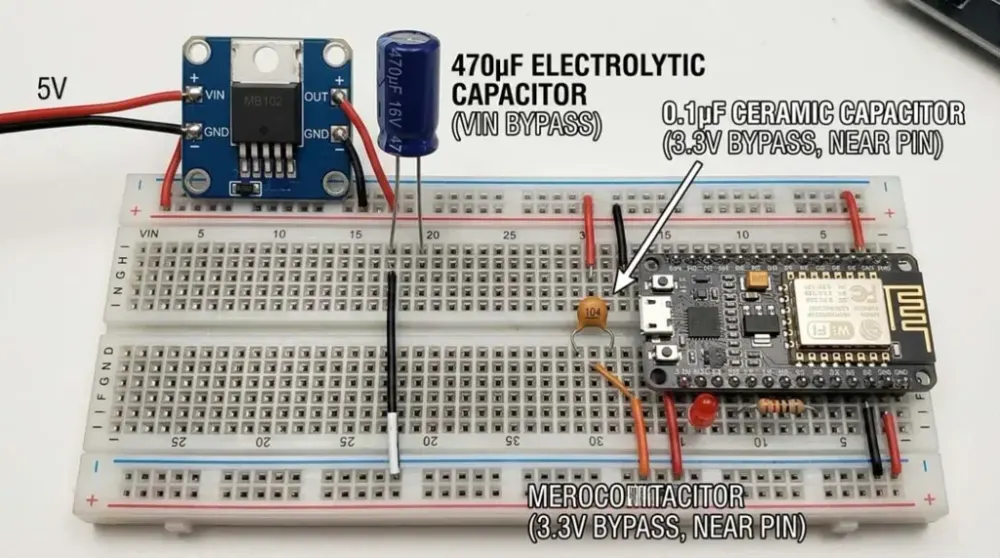
- Capacitor starvation: Without enough local energy reservoir, the voltage collapses during µ‑second surges. (Decoupling best practices) Image 2: Proper capacitor placement (470µF across VIN/GND + 0.1µF near 3.3V pin)
Breadboard view showing electrolytic and ceramic capacitors. (Place photo or Fritzing diagram)
The Fix: A Decision Matrix for Your Scenario
| Scenario | Method | Pros | Cons | Best For |
|---|---|---|---|---|
| Prototyping / USB | The “Good Cable” Swap | Cheap, immediate test | Doesn’t fix motor noise | Desk testing with known charger |
| Prototyping / Battery | Add 470-1000µF cap + 0.1µF ceramic | Smooths WiFi transients | Bulky on breadboard | Battery dataloggers, bursty WiFi |
| Deployment / 5V logic | External 3.3V regulator (LD1117V33) | Bypasses onboard LDO, rock‑solid | Requires soldering | Permanent installations |
| Deployment / 3.3V | Direct 3.3V pin (bypass regulator) | Highest efficiency | Risky: must be exactly 3.3V | Advanced users with step‑down |
| Software quick‑fix | Lower CPU frequency | Reduces peak current, simple code | Slower performance | Emergency patch for existing hw |
How to choose the right USB cable External regulator wiring tutorial ESP32 deep sleep current savings
Pro Tips from the Field (Beyond the Basics)
- The "Capacitor Blast" technique. Place a 470µF to 1000µF electrolytic across VIN/GND and a 0.1µF ceramic right at the 3.3V pin. The large cap handles the heavy lifting while the ceramic filters high-frequency noise. This combination eliminates roughly 90% of battery-powered brownouts.
- Check for parasitic power drain. If you power sensors from the 3.3V pin and the total draw exceeds about 200mA (ESP32 plus sensors), the onboard regulator overheats and its output voltage droops. Power high-draw components such as OLED displays and servos from the 5V/USB rail instead.
- USB cable microscope. Look for cables marked AWG20 or AWG24 for the power wires. Lightweight cables with thin conductors have enough series resistance to guarantee a brownout during WiFi transmit bursts.
Quick Fix Comparison: Capacitor vs. Regulator vs. Software
| Solution | Difficulty | Effectiveness | Cost | Permanent fix? |
|---|---|---|---|---|
| Big capacitor (470-1000µF) | Easy (solder or breadboard) | High for transients | ~$0.20 | Yes, for battery and supply ripple |
| Replace USB cable | Trivial | High if cable was the culprit | $3-10 | Yes, if the cable was at fault |
| External LDO regulator | Medium | Full isolation | $1-2 | Yes, industrial grade |
| Lower CPU frequency (software) | Very easy | Reduces, does not eliminate | Free | No, masks the symptom |
| Disable brownout detector | Easy (code) | Dangerous | Free | Never for production |
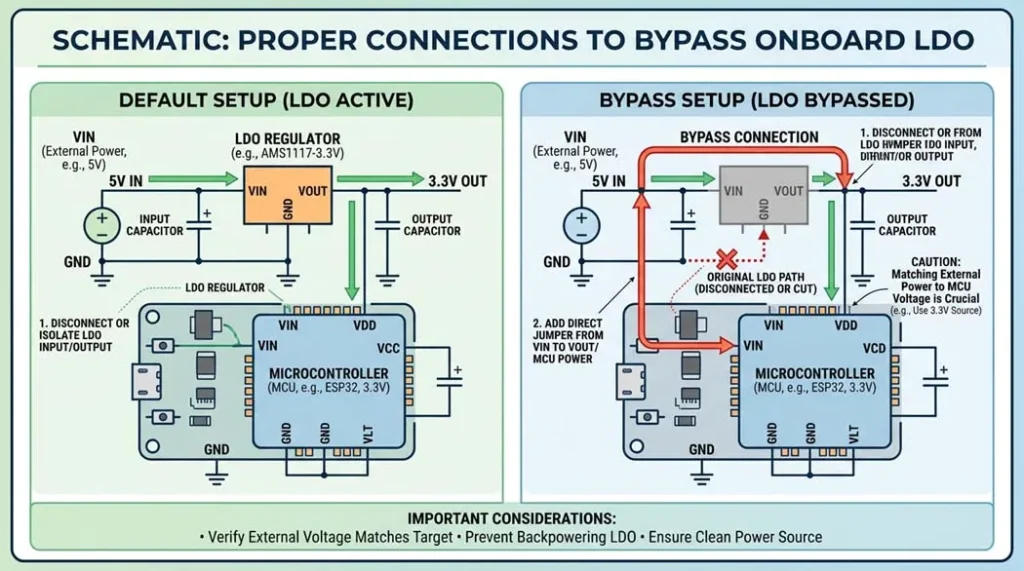
Image 3: External 3.3V Regulator (LD1117V33) Wiring
The schematic below shows proper input and output capacitors when bypassing the onboard LDO with an external regulator.
Unique Diagnostic: The 2-Minute Root-Cause Flowchart
A simple decision tree pinpoints the exact reason in about a minute:
- Step 1: Does it brown out only when WiFi transmits (for example every 5 seconds)? That is transient current starvation, so add bulk capacitance.
- Step 2: Does it fail even with a simple LED blink sketch, no WiFi? The power supply is too weak or the cable resistance is too high; measure voltage at VIN under load.
- Step 3: Works on USB, fails on battery? Battery voltage sags under load, so use a boost converter or a 2xAA battery pack with fresh cells.
- Step 4: Brownouts only when motors or servos activate? That is EMI and ground bounce, so separate the power domains and add flyback diodes.
Bonus unique snippet: Brownout was triggered but the voltage reads fine on your multimeter? The hidden cause is often ripple on the enable (EN) pin. Some ESP32 boards have a sensitive EN pin, and a 0.1µF capacitor from EN to GND can stop false resets. Almost nobody mentions this fix.
People Also Ask (10 Critical FAQs)
Can I disable the brownout detector permanently?
Yes, with WRITE_PERI_REG(RTC_CNTL_BROWN_OUT_REG, 0). But it is like removing the oil warning light: the chip may corrupt flash memory. Use it only for testing, never for production devices.
Why does my ESP32 work on USB but brown out on battery? Batteries have internal resistance, so their voltage sags under load. A Li-ion cell at 4.2V can drop to 3.6V during a WiFi transmit burst, and the regulator needs headroom to hold 3.3V. Use a boost converter or a 2xAA pack.
Can a cheap USB cable really cause brownouts? Absolutely. A 3m cable with thin power wires can drop 0.8V. Measure the voltage at the ESP32 VIN pin while transmitting; if it falls below about 4.5V, a brownout is inevitable.
What is the difference between a reset and a brownout?
A reset is a manual or clean restart. A brownout is a hardware fault condition: the low voltage detector forces a reset to protect memory. The serial monitor shows brownout detector was triggered.
Do capacitors really fix WiFi brownouts? Yes. A large electrolytic (470-1000µF) across VIN/GND provides reserve energy for WiFi current spikes. It fixes roughly 90% of battery-powered cases.
At what voltage does the ESP32 brownout detector actually trip? Typically around 2.5V to 2.7V for the internal digital logic. If VDD3P3 drops below that threshold, the detector trips and forces a reset.
Can a brownout damage the ESP32? The detector prevents damage by resetting early. But if you disable it, sustained low voltage can cause flash corruption or undefined behaviour.
How do I know if my 5V supply is strong enough? If you power via VIN (5V), the onboard LDO converts down to 3.3V. If the input drops below roughly 4.5V under load, the LDO drops out and a brownout follows. Always check the input voltage while the board is transmitting.
Why does WiFi specifically trigger brownouts? The WiFi radio enable draws a large current for a few milliseconds. The power source cannot react that fast, so the voltage dips until capacitors fill the gap.
Is it always a power problem? Not always. Sometimes high resistance in jumper wires or a poor breadboard contact is the real cause. Probe the 3.3V pin with an oscilloscope during WiFi activity and you will see the sag directly.
Safety Disclaimer
Modifying your ESP32, soldering, or using external power carries a risk of fire, shock, or permanent damage. Bypassing the onboard regulator requires an exact 3.3V source, so double-check with a multimeter before connecting. If you are unsure, consult a professional. We share knowledge, not liability.
Quick Code Snippet: Lower CPU Frequency (Software Band-Aid)
#include "esp32/rom/ets_sys.h"
// Place in setup()
setCpuFrequencyMhz(80); // drop from 240 to 80 MHz, reduces peak current
You can also call esp_wifi_set_ps(WIFI_PS_MIN_MODEM) to enable modem sleep and reduce average current. See the ESP-IDF power management documentation for details.
Related Guides in This Track
- New to IoT, Sensors and ESP32? Start with the IoT, Sensors and ESP32 complete guide, which indexes every tutorial in this track.
- ESP32 Getting Started: First Flash and WiFi Scan
- ESP32 GPIO and Strapping Pins: What Not to Use
- ESP32 WiFi That Never Dies: Reconnection Strategies
- Calculate the numbers: battery life calculator and the LM317 calculator
Practical Example
Re-run the steps above with your own numbers at the bench: record what you measure beside what this guide states, and investigate any gap larger than rounding. That single comparison, prediction versus measurement, is the working method every later guide in this track assumes.
Continue the Learning Path
- The complete track reference: IoT, Sensors and ESP32 complete guide
- Read next: LoRaWAN for beginners: long-range IoT without WiFi
- Also in this track: antenna basics for IoT: wavelength, gain and matching
- Continue with: biomedical sensors: how wearables measure the body
- Calculate as you go: battery life estimator, LM317 regulator designer, wire gauge checker
Last updated 23 August 2026